

The little changes are worth keeping
Keep the original. Make the next version yours.
A little more lemon. Less garlic next time. The version everyone asks for. Saltpaper keeps your changes as named versions alongside the original, so a good experiment does not erase where you started.
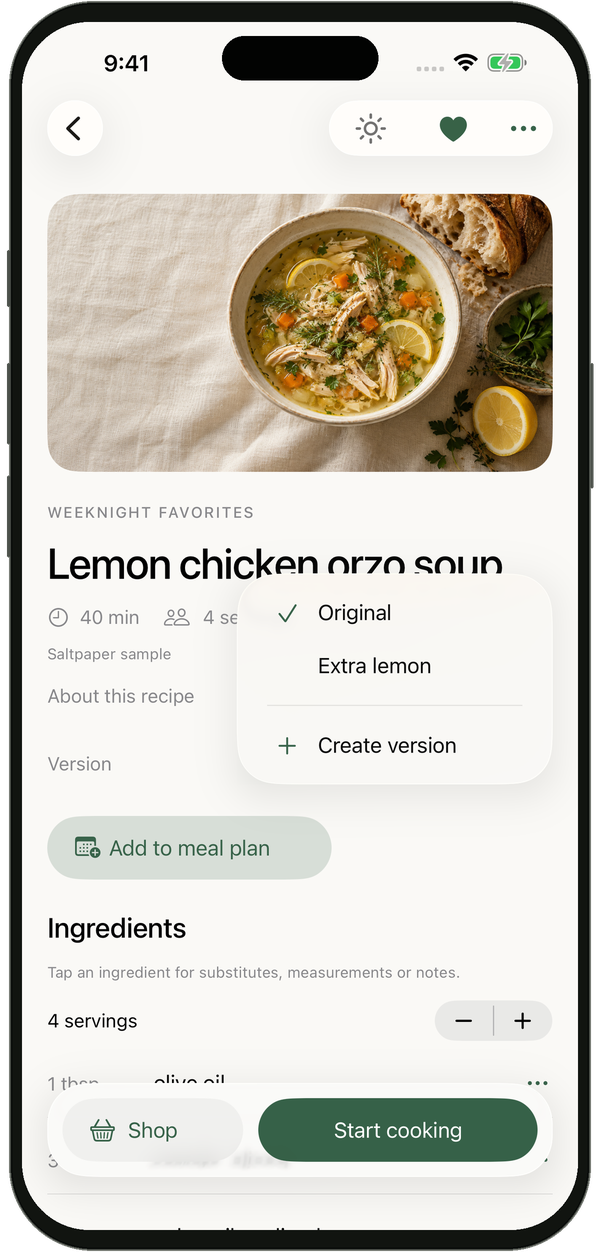
Give a useful change a name
Open a saved recipe and use the Version menu. Choose Create version, make your changes and save with a short name you will recognize later. The version name is separate from the recipe's full title.
A practical name tells you what changed: Extra lemon, Weeknight version or The one for Sunday. You do not need to copy the whole recipe into another card just to remember the adjustment.
- Start with the recipe you want to adapt and check that Original is selected.
- Choose Create version and edit the ingredients or directions you want to change.
- Give the version a short name, then choose Save version.
- Use the Version menu to switch between the original and your saved version before planning, shopping or cooking.
A note and a version do different jobs
For example, “More lemon next time” can begin as a note. Once you know the change you want, make a version with the amount you intend to use. The note records your experience; the version becomes the recipe you choose for that meal.
This is an example of organizing your own cooking, not a tested Saltpaper recipe or a recommendation for a particular quantity.
| What you want to remember | Where to put it |
|---|---|
| A different amount or cooking instruction | Save a named version with the changed recipe. |
| Something you noticed while cooking | Add a typed or handwritten note. |
| A detail about one ingredient | Keep a note with that ingredient. |
| A reminder at a particular point | Attach a note to the relevant step. |
Check the version before you shop or start cooking
The selected version supplies the ingredients for shopping and a new cooking session. Before tapping Shop or Start cooking, look at the Version menu and confirm that it is the one you mean to use. Check servings too, if the recipe includes a serving count.
Items already added to Shopping do not change when you later edit a recipe or choose another version. An existing cooking session also keeps the recipe you started with. If you decide to cook something different, check the session and shopping list rather than assuming they have followed the change.
A version decision checklist before dinner
Use this small record when you want an experiment to remain understandable later. It contains no suggested recipe quantities; the recipe and your own cooking judgment supply those.
| Write down | Why it helps |
|---|---|
| Starting point: Original or an existing named version | Makes the branch you are changing explicit. |
| Change: ingredient, direction or reminder | A recipe change belongs in a version; an observation can stay in a note. |
| Status: idea, tried once or worth repeating | Keeps an untested adjustment from looking like your usual recipe. |
| Version name and date of your own test | Helps you choose the intended version next time. |
| Shopping and cooking already started? | Existing lists and sessions keep their earlier contents. |
Compare the original and the variant deliberately
Before saving a change, use the Version menu to return to Original and remind yourself which ingredients or directions you intended to preserve. Then select your named version and check that the differences match your plan. Keep a note of an unexpected result instead of overwriting the original to explain it afterward.
If you change your mind after adding items to Shopping, check that list against the version you will actually cook. A saved version, a shopping list and an existing cooking session can describe different moments. Reconcile them before starting rather than assuming a later recipe edit updated all three.
After cooking, decide whether to edit that same version or keep a separate variation. Edit when you want that named version to change. Create another version when both deserve a place in the cookbook. A short result note helps future you understand the choice.
Keep an experiment without rewriting everything
Editing a saved version changes that version. Creating another version keeps both. Select a version and use its menu to edit, rename or remove it. Removing a version keeps the original recipe and your other versions.
It is fine to keep a version you have not tried yet. The name and your notes can make its status clear. When you finish cooking a version, add what worked while the details are fresh: a texture, a timing difference or the small adjustment you want to keep.
Use optional help on your own terms
You can make versions yourself. If you ask Saltpaper for a substitution or recipe adjustment, the connected assistance uses OpenAI with your permission. Review the suggested ingredients, amounts and directions before saving them as a version.
A suggestion has not been tested in your kitchen. Original recipe nutrition does not describe a changed version, and a change is not a guarantee about allergens or dietary suitability. Keep the source and your own checks close to the decision.
Keep the cookbook you have made
Saved recipes, versions and notes remain available offline. Make a separate cookbook backup from Settings when you want a portable copy. Back up the cookbook you have open, and check the support instructions before restoring or moving to another installation.
The original gives you a place to return. Your versions and notes preserve the part that only comes from cooking it yourself.
Keep the good recipe. Remember your good idea.
Always free. For iPhone with iOS 26 or later.
Download Saltpaper for iPhone